CLWN0x: Building a Practical Cryptography Tool from Scratch
When Theory Meets Practice: A Deep Dive into Modern Cryptographic Implementations
After spending countless hours working with cryptographic libraries in various projects, I’ve always found there’s a significant gap between understanding the theory and actually implementing secure systems. Books will tell you that RSA-OAEP is secure, that AES-GCM provides authenticated encryption, and that elliptic curves are the future—but they rarely show you the gritty details of key serialization formats, hybrid encryption schemes, or the million ways things can go wrong.
That’s where CLWN0x came from: a desire to build something that bridges this gap. Not just another CLI tool that wraps OpenSSL, but a practical, visual application that demonstrates how modern cryptography actually works under the hood. Let me walk you through what I learned building it.
The Problem with Cryptographic Tools
Most cryptographic tools fall into two categories: they’re either too simple (hiding all the interesting details) or too complex (assuming you already have a PhD in mathematics). I wanted something in between—a tool that:
- Actually shows you what’s happening at each step
- Supports multiple algorithms so you can compare them
- Handles real-world formats (PEM, OpenSSH, PGP)
- Doesn’t hide the complexity, but explains it
The result is a desktop application that generates keys, encrypts messages, and manages cryptographic material—all while giving you visibility into what’s happening.
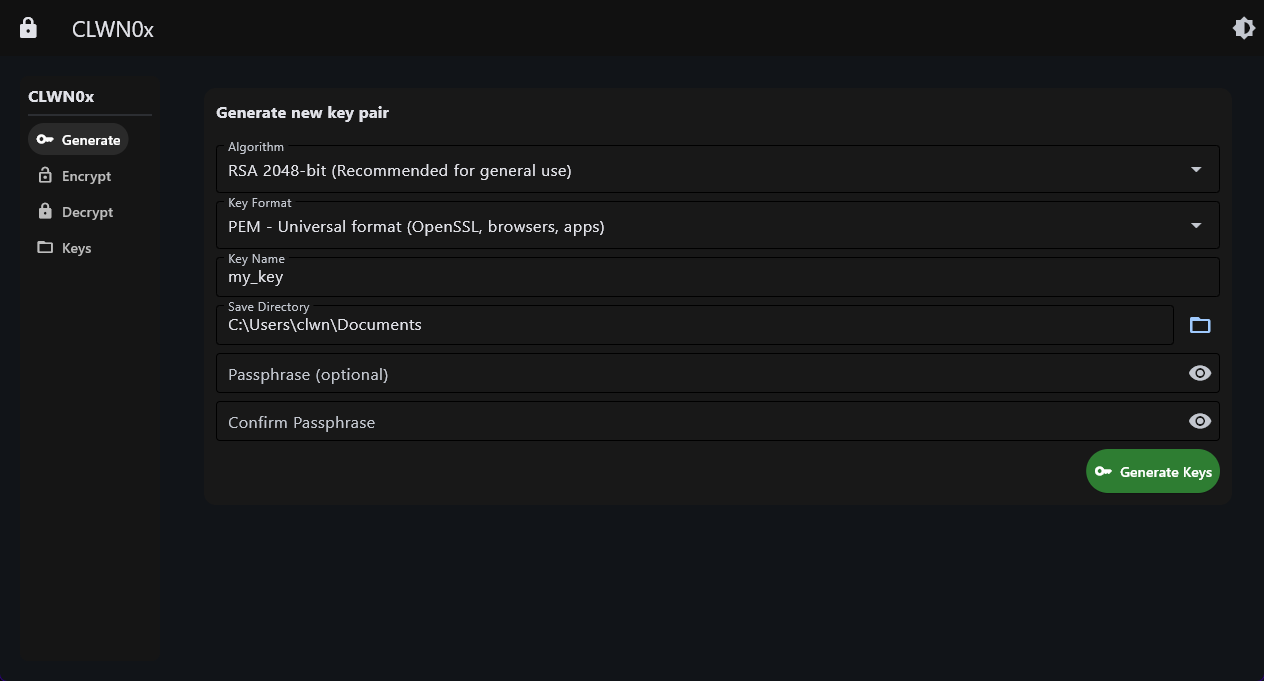 The key generation interface supports RSA, Ed25519, ECDSA, and PGP—each with different security profiles and use cases.
Architecture: Keeping Cryptography Modular
The application follows a clean separation of concerns:
1
2
3
4
core/
├── key_manager.py         # Key generation and serialization
├── crypto_operations.py   # Encryption/decryption logic
└── file_manager.py        # File I/O and format detection
This modularity is crucial in cryptographic applications. You want to isolate your crypto code, make it auditable, and ensure that file operations don’t accidentally leak sensitive data into logs or temporary files.
The Key Manager: More Than Just Key Generation
The KeyManager class handles six different algorithms, each with their own quirks:
RSA (2048/4096-bit): The workhorse of public-key cryptography. Everyone knows RSA, but what people often miss is that raw RSA encryption is actually insecure. You need proper padding (OAEP), and even then, RSA is slow for large messages. More on that later.
Ed25519: Probably my favorite algorithm here. It’s a modern elliptic curve algorithm designed by Daniel J. Bernstein, and it’s beautiful in its simplicity. Fixed 256-bit keys, no parameters to mess up, blazingly fast signatures. The catch? It’s signature-only. You can’t encrypt with it, which is why the application explicitly checks for this and prevents users from trying.
ECDSA (P-256/P-384): NIST’s standardized elliptic curves. P-256 offers roughly 128-bit security (equivalent to RSA-3072), while P-384 gives you 192-bit security. These work for both encryption and signatures, making them versatile.
PGP: The elephant in the room. PGP (via the pgpy library) is its own ecosystem—ASCII-armored keys, its own message format, built-in key management. It’s what you use when you need email encryption or when you want to integrate with existing PGP workflows.
The interesting part? Each algorithm requires different serialization logic:
1
2
3
4
5
6
7
8
9
10
11
12
13
14
15
16
# RSA/ECDSA to PEM (PKCS#8)
private_bytes = private_key.private_bytes(
    encoding=serialization.Encoding.PEM,
    format=serialization.PrivateFormat.PKCS8,
    encryption_algorithm=encryption_algo
)

# But OpenSSH format is different
private_bytes = private_key.private_bytes(
    encoding=serialization.Encoding.PEM,
    format=serialization.PrivateFormat.OpenSSH,
    encryption_algorithm=encryption_algo
)

# And PGP? Completely different library
key = pgpy.PGPKey.new(PubKeyAlgorithm.RSAEncryptOrSign, 4096)
This is the kind of thing you only learn by implementing it. Books tell you about algorithms; code teaches you about formats.
Hybrid Encryption: The Reality of Public-Key Cryptography
Here’s a dirty secret about RSA: you can’t actually encrypt large messages with it. RSA-2048 can only encrypt 190 bytes of data (with OAEP padding). Try to encrypt a 1KB message and you’ll get an error.
The solution is hybrid encryption, and this is where things get interesting.
The RSA Hybrid Scheme
When you encrypt a message with CLWN0x using RSA, here’s what actually happens:
1
2
3
4
5
1. Generate a random 256-bit AES key
2. Encrypt the message with AES-256-GCM (fast, symmetric encryption)
3. Encrypt the AES key with RSA-OAEP (slow, but only 32 bytes)
4. Package everything together: [key_length|encrypted_aes_key|nonce|encrypted_message]
5. Base64 encode for transport
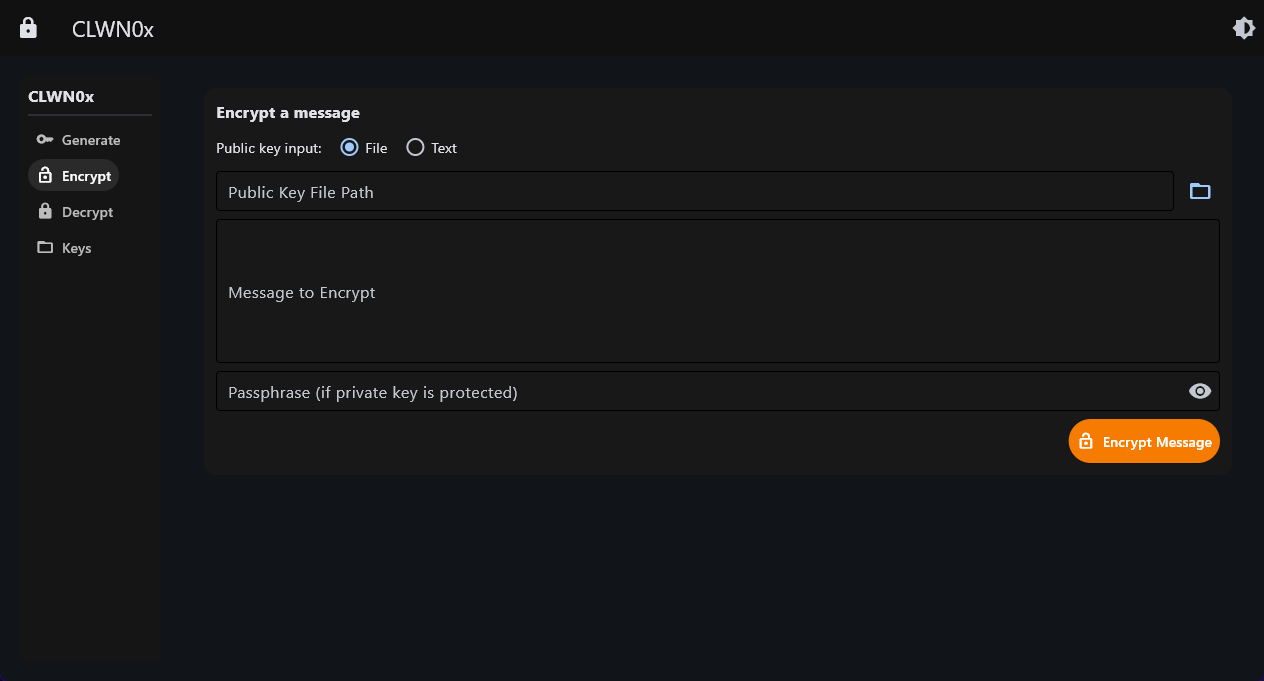 The encryption interface automatically detects key types and applies the appropriate algorithm.
This is elegant for several reasons:
Performance: AES is hundreds of times faster than RSA for bulk data.
Security: AES-GCM is an AEAD (Authenticated Encryption with Associated Data) cipher, meaning it provides both confidentiality and authenticity. You can’t decrypt the message if it’s been tampered with.
Padding: RSA-OAEP uses randomized padding, so encrypting the same message twice produces different ciphertexts. This prevents known-plaintext attacks.
The implementation uses MGF1 with SHA-256 for the mask generation function:
1
2
3
4
5
6
7
8
encrypted_key = public_key.encrypt(
    aes_key,
    padding.OAEP(
        mgf=padding.MGF1(algorithm=hashes.SHA256()),
        algorithm=hashes.SHA256(),
        label=None
    )
)
Why SHA-256 and not SHA-1? Because SHA-1 is broken for collision resistance. Even though MGF1 doesn’t strictly require collision resistance, defense-in-depth says: use the secure algorithm.
The ECIES Scheme: Ephemeral Keys and Perfect Forward Secrecy
Elliptic curve encryption is even more interesting because it uses a completely different approach: ECIES (Elliptic Curve Integrated Encryption Scheme).
Here’s the flow:
1
2
3
4
5
1. Generate an ephemeral EC key pair (used only for this message)
2. Perform ECDH (Elliptic Curve Diffie-Hellman) with recipient's public key
3. Derive AES key from shared secret using HKDF-SHA256
4. Encrypt message with AES-GCM
5. Send the ephemeral public key along with the ciphertext
The magic happens in step 2. ECDH allows two parties to arrive at the same shared secret without ever transmitting it:
1
shared_key = ephemeral_private_key.exchange(ec.ECDH(), public_key)
The recipient can compute the same shared secret using their private key and the ephemeral public key you sent. It’s the cryptographic equivalent of two people agreeing on a secret by shouting different random numbers at each other—mathematically beautiful.
Then we use HKDF to derive a proper AES key:
1
2
3
4
5
6
7
derived_key = HKDF(
    algorithm=hashes.SHA256(),
    length=32,
    salt=None,
    info=b'encryption',
    backend=default_backend()
).derive(shared_key)
Why HKDF? Because the raw ECDH output isn’t uniformly distributed—it’s a curve point. HKDF is a key derivation function that extracts cryptographically strong key material from this shared secret.
The best part? Perfect Forward Secrecy. Because we use ephemeral keys, even if someone later steals the recipient’s private key, they can’t decrypt old messages. The ephemeral private key is discarded immediately after encryption.
File Format Gymnastics: PEM, OpenSSH, and PGP
One of the most underrated challenges in cryptographic software is dealing with different file formats. CLWN0x supports three:
PEM (Privacy Enhanced Mail): The de facto standard. Base64-encoded DER with delimiters:
1
2
3
-----BEGIN PRIVATE KEY-----
MIIEvQIBADANBgkqhkiG9w0BAQEFAASCBKcwggSjAgEAAoIBAQC...
-----END PRIVATE KEY-----
OpenSSH: Used by SSH keys, has a different header and binary structure:
1
2
3
-----BEGIN OPENSSH PRIVATE KEY-----
b3BlbnNzaC1rZXktdjEAAAAABG5vbmUAAAAEbm9uZQAAAAA...
-----END OPENSSH PRIVATE KEY-----
PGP: ASCII-armored with CRC checksums and packet structure:
1
2
3
4
-----BEGIN PGP PRIVATE KEY BLOCK-----

lQdGBGcqR5sBEACqL8Y5YNz8XqLT...
-----END PGP PRIVATE KEY BLOCK-----
The real challenge is detecting which format you’re dealing with and handling each appropriately. The application uses a multi-stage detection approach:
1
2
3
4
5
6
7
8
9
10
11
12
13
14
15
16
17
18
def detect_key_format(key_data: bytes) -> str | None:
    decoded = key_data.decode('utf-8').strip()

    # Check for PGP first (most specific)
    if 'BEGIN PGP' in decoded:
        return "PGP"

    # Check for generic PEM
    if decoded.startswith('-----BEGIN') and '-----END' in decoded:
        return "PEM"

    # Check for OpenSSH public key
    if decoded.startswith(('ssh-rsa ', 'ssh-ed25519 ', 'ecdsa-sha2-')):
        return "OpenSSH"

    # Check for OpenSSH private key
    if 'OPENSSH PRIVATE KEY' in decoded:
        return "OpenSSH"
Then, loading each format requires different library calls:
1
2
3
4
5
6
# Try PEM first
try:
    return serialization.load_pem_private_key(key_data, password_bytes)
except ValueError:
    # Fall back to OpenSSH
    return serialization.load_ssh_private_key(key_data, password_bytes)
This kind of defensive programming is essential in crypto tools. Users will throw all kinds of inputs at you, and failing gracefully with helpful error messages is just as important as the encryption itself.
Passphrase Handling: The Right Way
When you protect a private key with a passphrase, the key itself is encrypted before being written to disk. Different formats use different encryption methods:
PEM/PKCS#8: Typically uses AES-256-CBC with PBKDF2 for key derivation. The cryptography library’s BestAvailableEncryption class handles this:
1
2
3
encryption_algo = serialization.BestAvailableEncryption(
    password.encode("utf-8")
)
OpenSSH: Uses bcrypt as the KDF (that’s why bcrypt is a dependency). OpenSSH keys with passphrases require the bcrypt library to derive the encryption key.
PGP: Has its own system using S2K (String-to-Key) specifications:
1
2
3
4
5
key.protect(
    password,
    SymmetricKeyAlgorithm.AES256,
    HashAlgorithm.SHA256
)
The application validates passphrases before generation:
1
2
3
if passphrase_input.value != passphrase_confirm_input.value:
    show_error("Passphrases do not match")
    return
And provides specific error messages when loading fails:
1
2
3
4
5
except ValueError as e:
    if "password-protected" in str(e).lower():
        show_error("This key is password-protected. Please provide a passphrase.")
    elif "Incorrect password" in str(e):
        show_error("Incorrect passphrase for the private key.")
These details matter. Users shouldn’t have to guess whether they typed the wrong password or forgot to enter one at all.
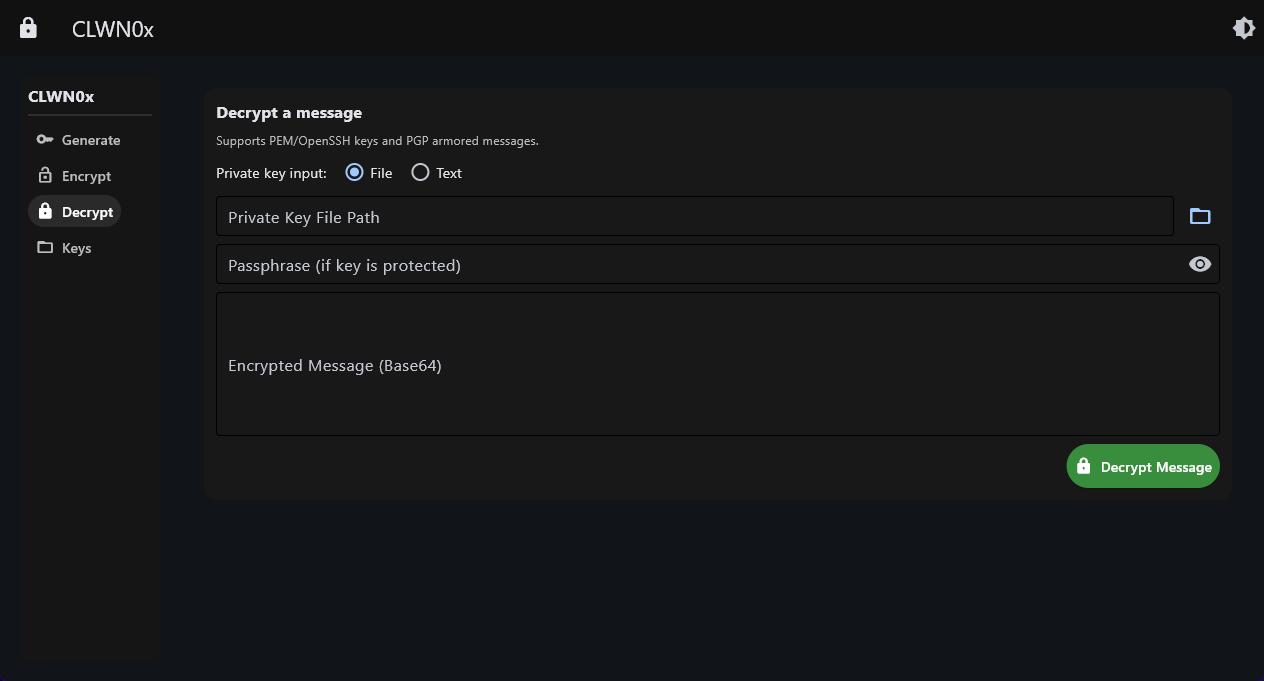 The decrypt interface with key management showing secure handling of passphrases.
Security Considerations: What Could Go Wrong
Building a cryptographic tool means thinking about all the ways it could be misused or attacked:
1. Memory Handling
Python strings are immutable and aren’t zeroed after use. This means passphrases linger in memory until the garbage collector runs. For a production system, you’d want to use SecureString or similar constructs. For an educational tool, this is an acceptable tradeoff.
2. Side-Channel Attacks
The application doesn’t attempt to prevent timing attacks or power analysis. The cryptography library provides some resistance, but a motivated attacker with physical access could potentially extract keys. This is why the README includes a disclaimer about production use.
3. Random Number Generation
All random operations use os.urandom(), which is cryptographically secure on modern operating systems. Never use random.random() for crypto—it’s not cryptographically secure.
1
2
nonce = os.urandom(12)  # Good
aes_key = AESGCM.generate_key(bit_length=256)  # Also good (uses secure RNG)
4. Authenticated Encryption
Everything uses AES-GCM, not AES-CBC. GCM provides authentication, preventing bit-flipping attacks and ensuring the ciphertext hasn’t been modified. This is critical:
1
2
3
4
5
6
7
8
9
# Encryption produces: ciphertext + auth tag
encrypted_message = aesgcm.encrypt(nonce, message_bytes, None)

# Decryption verifies the tag
try:
    decrypted = aesgcm.decrypt(nonce, encrypted_data, None)
except InvalidTag:
    # Message was tampered with
    raise DecryptionError("Authentication tag mismatch")
5. Key Permissions
On Linux, the application recommends setting private key permissions to 600:
1
chmod 600 private_key.pem
On Windows, this is less straightforward (NTFS ACLs are complex), so the application relies on users storing keys in protected directories.
The GUI: Flet and Modern Desktop Development
I chose Flet for the GUI, which is relatively new in the Python ecosystem. It’s based on Flutter but uses Python instead of Dart. This gave me:
Cross-platform support: Runs on Windows, Linux, and macOS without modification.
Modern UI: Material Design components that look current, not like a Tkinter app from 2005.
Reactive updates: The UI updates automatically when state changes:
1
2
3
result_area.controls.clear()
result_area.controls.extend([...new_controls])
self.page.update()  # Triggers re-render
File pickers and native dialogs: Platform-native file selection:
1
2
3
file_picker = ft.FilePicker(on_result=on_file_picked)
self.page.overlay.append(file_picker)
file_picker.pick_files()
The navigation system uses a simple state machine:
1
2
3
4
5
6
7
def set_view(name: str):
    self.current_view = name
    if name == "generate":
        self.content_container.content = self.build_generate_tab()
    elif name == "encrypt":
        self.content_container.content = self.build_encrypt_tab()
    # ... etc
Each tab is a separate method that returns a Container with all the UI elements. This keeps the code modular and testable.
Lessons Learned
1. Cryptography Libraries Are Opinionated (And That’s Good)
The cryptography library forces you to use secure defaults. You can’t use ECB mode for AES. You can’t use raw RSA without padding. These constraints are features, not bugs.
2. Error Messages Matter
Half the code is error handling and user feedback. When decryption fails, you need to tell the user why: wrong key? corrupted message? missing passphrase? Generic “decryption failed” messages are useless.
3. Format Support Is a Rabbit Hole
Supporting PEM was easy. Adding OpenSSH support required bcrypt. PGP required a whole separate library. Each format has edge cases—password-protected keys, different encodings, various key types. Test thoroughly.
4. GUI Development in Python Has Come a Long Way
Flet makes it possible to build genuinely nice-looking desktop apps in Python. No more choosing between Tkinter’s ugliness and PyQt’s complexity.
5. Documentation Is Part of the Security Model
Users need to understand what they’re doing with cryptographic tools. The application includes tooltips, clear labels, and the README explains when to use each algorithm. Security through obscurity is not security.
What’s Next?
This project taught me more about practical cryptography than any textbook could. Future improvements could include:
- Digital signatures (Ed25519/ECDSA signature generation and verification)
- Key exchange protocols (interactive Diffie-Hellman)
- Certificate management (X.509 certificate creation and validation)
- Plugin system for custom encryption schemes
- Memory-safe passphrase handling
But for now, CLWN0x does what I wanted it to do: it makes cryptography tangible. You can see the keys, understand the formats, and observe how hybrid encryption works in practice.
Try It Yourself
The code is open source at github.com/agussanguesa32/clwn0x. Clone it, generate some keys, encrypt a message. Break things. That’s how you learn.
1
2
3
4
5
6
git clone https://github.com/agussanguesa32/clwn0x
cd clwn0x
python -m venv venv
source venv/bin/activate  # or .\venv\Scripts\Activate on Windows
pip install -r requirements.txt
python -m clwn0x
And remember: this is an educational tool. For production systems, use established solutions like GnuPG, age, or cloud KMS services. But for learning how cryptography actually works? Build something yourself.
The full source code and detailed documentation are available on GitHub. Feel free to open issues, suggest improvements, or fork the project for your own experiments.