Securing a Multi-Service Infrastructure: A Deep Dive into Containerized Security

🛡️ Multi-Layer Security for 6Humanos Project, a private Rocket League matchmaking platform with +3000 users
📑 Table of Contents
🎯 Project Overview
6Humanos PUG is a private matchmaking platform for Rocket League players, designed to provide a competitive environment outside the official game rankings. The platform offers:
- Skill-Based Matchmaking: Players are divided into tiers based on their skill level
- Competitive Structure: Monthly leaderboards with promotion/relegation system
- Safe Practice Environment: Players can compete and improve without affecting their in-game ranking
- Community Focus: Currently serving over 3,800 players in South America
- Growth Potential: Infrastructure designed for expansion to other regions
The platform operates through Discord integration, where players can:
- Join the community server
- Register their gaming accounts
- Receive skill-based tier assignments
- Participate in matches within their tier
- Track their progress and rankings
This infrastructure was designed with scalability in mind, aiming to expand beyond South America and accommodate players from different regions while maintaining security and performance.
🏗️ System Architecture
🔧 Core Components
- 📊 PostgreSQL Database
- Handles player data, rankings, and match history
- Secure data storage and retrieval
- Performance-optimized queries
- 🤖 Discord Bot
- Manages user interactions and matchmaking
- Real-time command processing
- Match coordination
- 🌐 REST API
- Provides endpoints for web interface and bot operations
- Secure authentication and authorization
- Rate limiting and protection
- 💻 Web Application
- Built with Next.js and hosted on Vercel
- User interface for rankings and statistics
- Player profile management
- Tournament organization interface
- Real-time match tracking
The first three components are containerized and hosted on a VPS using Docker Compose, creating an isolated and secure environment. The web application is deployed separately on Vercel’s edge network for optimal performance and global availability.
🛡️ Security Implementation
🌐 Network Security
🔌 Internal Network Isolation
The services communicate through a dedicated internal Docker network, which provides several security benefits:
- Complete isolation from external networks
- Encrypted communication between containers
- No direct exposure of internal services to the internet
🔒 Port Management
- 🗄️ Database Access Control
- Internal access is restricted to localhost only
- All other connection attempts are blocked
- 🔐 API Security
- The API service is bound to localhost only
- External access is exclusively through Cloudflare Tunnel
- No need to expose any ports to the internet
- Complete IP masking and DDoS protection
- Security Headers Implementation
1
2
3
4
5
6
7
8
9
10
@app.after_request
def add_security_headers(response):
    response.headers.update({
        'X-Content-Type-Options': 'nosniff',
        'X-Frame-Options': 'ALLOW-FROM https://6humanos.cloud https://www.6humanos.cloud',
        'X-XSS-Protection': '1; mode=block',
        'Strict-Transport-Security': 'max-age=31536000; includeSubDomains',
        'Content-Security-Policy': "default-src 'self' discord.com store.steampowered.com 'unsafe-inline'; frame-ancestors https://6humanos.cloud https://www.6humanos.cloud"
    })
    return response
- Headers implementation:
X-Content-Type-Options: Prevents MIME type sniffingX-Frame-Options: Controls embedding in iframesX-XSS-Protection: Protection against XSSStrict-Transport-Security: Forces HTTPS connectionsContent-Security-Policy: Controls allowed resources
- 🤖 Bot Service
- Internal bot management interface is restricted to localhost
- Discord connectivity is handled through outbound connections only
- No inbound ports needed
☁️ Cloud Security
⚡ Cloudflare Integration
The REST API is exposed through Cloudflare’s infrastructure, providing multiple layers of security:
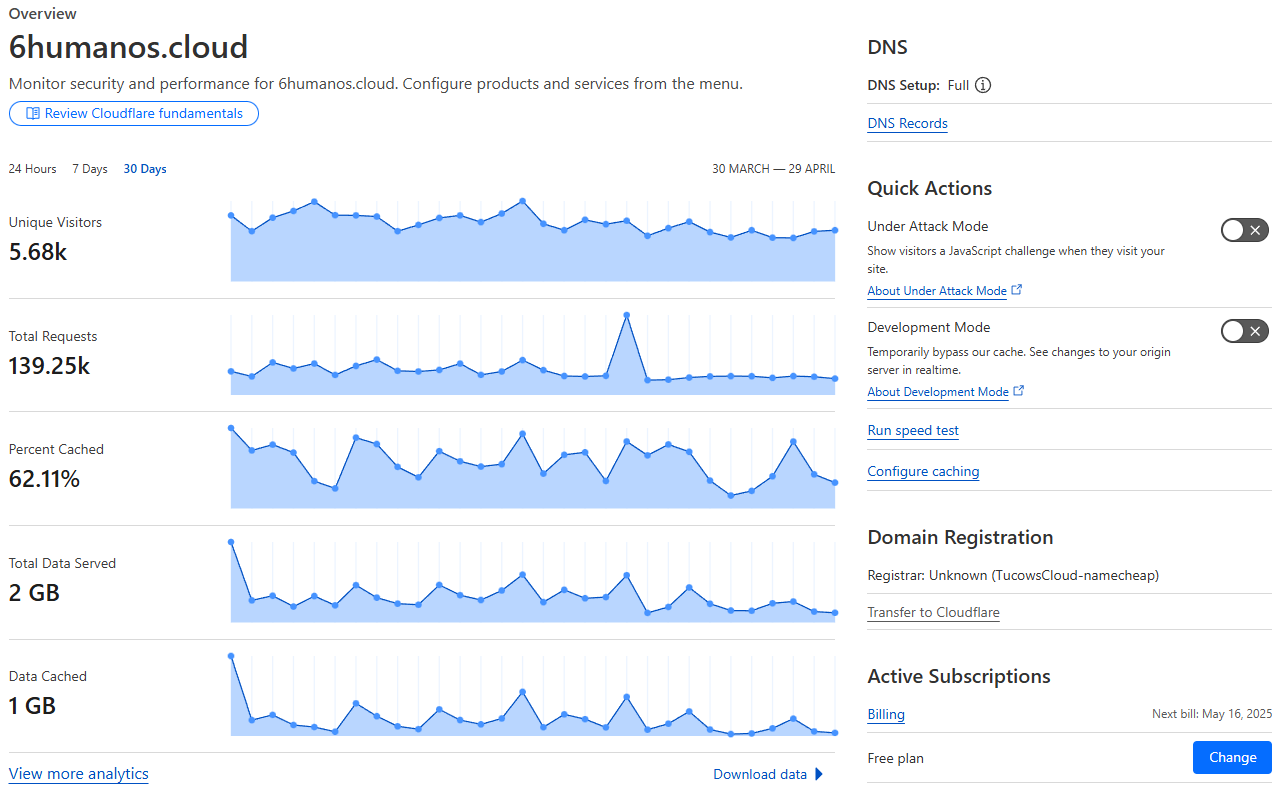 Cloudflare Dashboard showing traffic overview and metrics
- 🛡️ DDoS Protection
- Automatic mitigation of volumetric attacks
- Rate limiting and IP reputation analysis
- Web Application Firewall (WAF) rules
- 🔒 SSL/TLS Security
- End-to-end encryption using Cloudflare’s SSL certificates
- TLS 1.3 enforcement
- Automatic certificate rotation
- 🔄 Proxy Configuration
- Origin IP masking
- Traffic filtering
- Bot protection
📱 Application Security
🔑 API Authentication
- 🔐 Limited Access Keys
- Only two API keys are authorized in the entire system
- Each key has its own specific access level and permissions
- Keys are rotated periodically for additional security
- 👨💼 Administrative Access
- One API key is reserved for administrative operations
- Full access to all API endpoints and functionalities
- Used exclusively by the system administrator
- 🌐 Web Application Access
- Second API key dedicated to web application operations
- Restricted access level with limited endpoint availability
- Only authorized to perform specific web-related operations
🤖 Discord Bot Security
- 📝 Command Registration Layer
- Commands are registered based on Discord server roles
- Visibility segregation by user type:
- Administrators: Full access to all commands
- Moderators: Access to specific moderation commands
- Users: Access to basic user-level commands
- Commands not visible are completely inaccessible to unauthorized roles
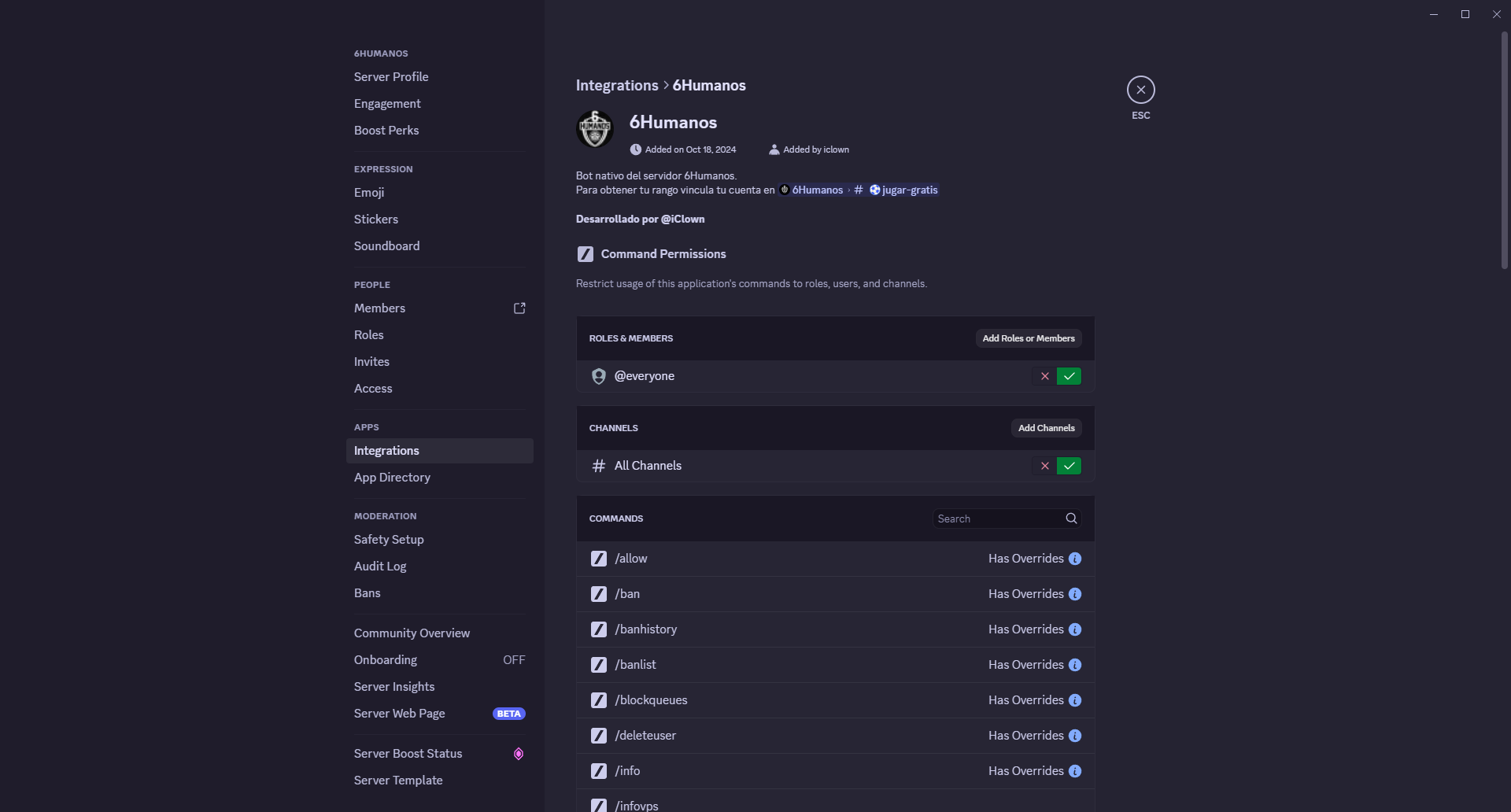 Discord’s native command permission system showing role-based access control
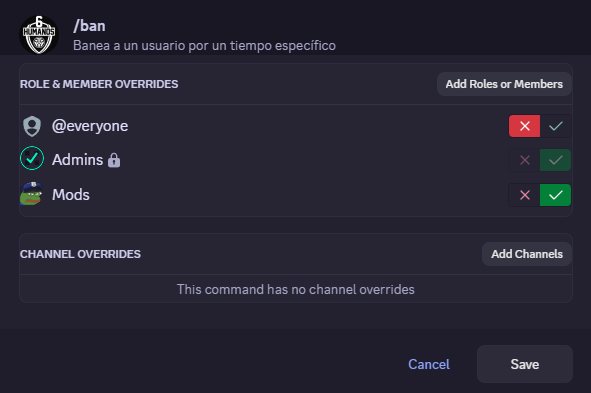 Example of permission configuration for the /ban moderation command
 - ⚡ Execution Permission Layer
- Secondary role verification at runtime
- Bot independently validates user permissions
- Additional security check even if command visibility fails
- Prevents command execution through unauthorized methods
The permission check is implemented through a flexible role verification system:
1
2
3
4
5
6
7
8
9
10
11
12
13
14
15
16
17
18
19
async def check_staff_permissions(interaction: discord.Interaction, mod_allowed: bool = False):
    has_admin_role = any(role.id == int(ADMIN_ROLE_ID) for role in interaction.user.roles)

    if has_admin_role:
        return True

    if mod_allowed:
        has_mod_role = any(role.id == int(MODERATOR_ROLE_ID) for role in interaction.user.roles)
        return has_mod_role

    return False

# Example usage in a command
if not await check_staff_permissions(interaction, mod_allowed=True):
    await interaction.response.send_message(
        "❌ You don't have permission to use this command.",
        ephemeral=True
    )
    return
This implementation provides granular control over command access:
mod_allowedparameter determines command accessibility:False: Command is restricted to administrators onlyTrue: Both administrators and moderators can execute the command
- Hierarchical permission structure:
- Administrators always have access to all commands
- Moderators can access specific commands when explicitly allowed
- Regular users are automatically denied access
- Fail-safe approach where permissions default to denied unless explicitly granted
- 📋 Command Categories
- 👨💼 Administrative Commands
- Server statistics access
- System configuration commands
- Overall platform management
- 🛡️ Moderation Commands
- User moderation (ban, unban)
- Warning system (warn)
- Banned users list viewing
- Disciplinary actions management
- 👤 User Commands
- Personal statistics viewing
- Leaderboard access
- Substitute requests for matches
- Individual information queries
- 👨💼 Administrative Commands
- 🛡️ Anti-Phishing and Compromised Accounts System
The bot implements an advanced spam and phishing detection system that monitors all server messages. This system uses multiple verification layers to identify suspicious messages:
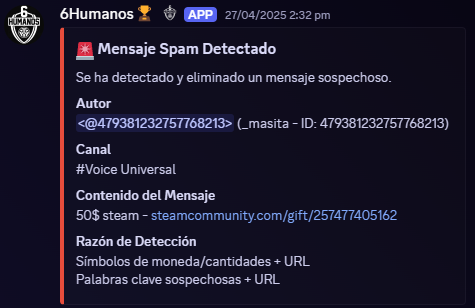 Example of spam detection alert in the administration channel
Key Features:
- 🔍 Suspicious URL Detection
- Typosquatting domain analysis
- Whitelist of safe domains
- Homograph character detection
- Legitimate CDN domain verification
- 💰 Scam Pattern Detection
- Messages with money or cryptocurrency references
- Common scam keywords (gift, free, nitro)
- Suspicious URL and keyword combinations
- Urgency and pressure patterns
- 🛡️ Mass Mention Protection
- @everyone and @here monitoring
- Suspicious mention detection
- Mention permission verification
Detection Example:
1
2
3
4
5
6
7
8
# Example of suspicious message
"🎉 FREE NITRO GIFT! Click here -> discord.gift/xyz123"

# System detects:
1. Keyword "FREE" + "NITRO" + "GIFT"
2. Suspicious URL "discord.gift"
3. Urgency pattern with emoji
4. Click link request
Core Detection Logic:
1
2
3
4
5
6
7
8
9
10
11
12
13
14
15
16
17
18
19
20
21
22
23
24
25
26
27
28
29
30
31
32
33
34
35
36
37
38
39
40
41
42
43
44
45
46
47
48
49
50
51
52
53
54
55
56
57
58
59
class SpamDetector:
    def __init__(self):
        # Critical keywords that often indicate spam
        self.critical_keywords = [
            r'nitro',
            r'gift',
            r'free\s*(?:nitro|steam|discord|crypto)',
            r'steam\s*gift',
            r'claim',
            r'giveaway',
            r'reward',
            r'drop',
            r'win(?:ner)?',
            r'limited\s*time'
        ]

        # Compile patterns for detection
        self.critical_pattern = re.compile(
            '|'.join(self.critical_keywords),
            re.IGNORECASE
        )

        # URL pattern detection
        self.url_pattern = re.compile(
            r'http[s]?://(?:[a-zA-Z]|[0-9]|[$-_@.&+]|[!*\\(\\),]|(?:%[0-9a-fA-F][0-9a-fA-F]))+'
        )

    def is_spam(self, message: str) -> bool:
        """Core spam detection logic"""
        # Check for critical keywords and URLs
        if self.critical_pattern.search(message) and self.url_pattern.search(message):
            return True

        # Check for money/crypto references with URLs
        if re.search(r'(?:[$€£¥]\s*\d+|\d+\s*[$€£¥]|usd|eur|btc|eth)', message, re.IGNORECASE):
            if self.url_pattern.search(message):
                return True

        return False

    async def handle_spam(self, message: discord.Message):
        """Handle detected spam message"""
        # Create alert embed
        embed = discord.Embed(
            title="🚨 Spam Detected",
            description="A suspicious message has been detected and removed.",
            color=discord.Color.red()
        )

        # Add message details
        embed.add_field(
            name="Author",
            value=f"{message.author.mention} ({message.author.id})",
            inline=False
        )

        # Send alert and delete message
        await self.alert_channel.send(embed=embed)
        await message.delete()
System Operation Overview:
The spam detection system operates through multiple layers of analysis:
- 🔄 Message Processing Pipeline
- Every message is processed through the detection system
- Messages from bots and administrators are automatically whitelisted
- The system checks multiple indicators simultaneously
- 🔍 Pattern Analysis
- Regular expressions scan for suspicious patterns
- Keywords are checked in combination with URLs
- Multiple patterns must match to trigger detection
- Case-insensitive matching prevents evasion attempts
- 🔗 URL Analysis
- All URLs are extracted and analyzed
- Domain names are checked against whitelists
- Typosquatting detection prevents similar-looking domains
- CDN and media URLs are automatically allowed
- ⚡ Response System
- Immediate message deletion upon detection
- Detailed alert sent to administration channel
- Author information and message content logged
- Prevention of repeated spam attempts
- 🛡️ False Positive Prevention
- Multiple verification layers reduce false positives
- Whitelisted domains and patterns
- Context-aware detection
- Regular pattern updates based on new threats
🚨 Cross-Platform Admin Alert System
The platform implements a comprehensive alert system that ensures administrators are promptly notified of important events through multiple channels:
- 📱 Telegram Integration
- Real-time notifications sent to admin group
- Support requests from users
- Critical security alerts
- System status updates
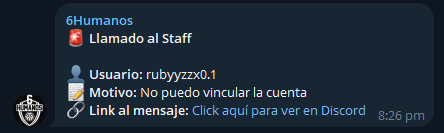 Example of user help request sent to admin Telegram group
 - 🔔 Discord Direct Messages
- Redundant alerts sent via Discord DMs
- Ensures administrators receive notifications even if Telegram is unavailable
- Identical message content for consistency
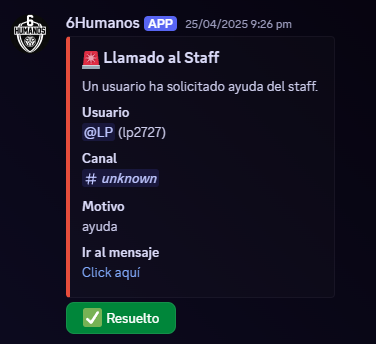 Same help request delivered through Discord direct message
 - 🧐 Suspicious Account Detection
- Automatic detection of duplicate account registration attempts
- Pattern recognition for suspicious registration behavior
- Instant administrator notification for manual verification
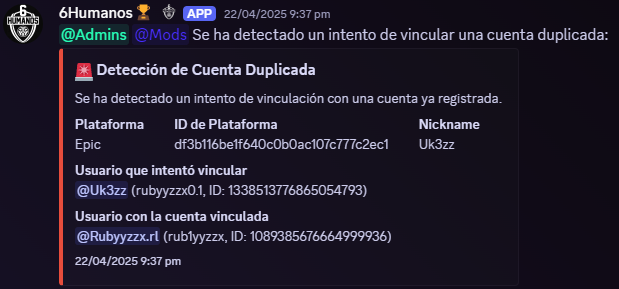 Alert triggered by suspicious duplicate account registration attempt
This multi-channel notification system ensures:
- No critical alerts are missed
- Administrators can respond quickly to security incidents
- User support requests receive prompt attention
- System integrity is continuously monitored
🌐 Web Application Security
 6humanos.cloud landing page
🔐 Authentication and Authorization
The web application implements a robust authentication system using NextAuth.js with Discord as the primary provider:
1
2
3
4
5
interface JWT {
  exp?: number;
  isAdmin?: boolean;
  csrfToken?: string;
}
Key Features:
- JWT-based authentication with extended properties
- Token expiration handling
- Role-based access control
- Secure token storage and validation
🛡️ CSRF Protection
Multi-layered CSRF protection implementation:
1
2
3
4
5
6
7
const generateToken = (nonce: string) => {
  const timestamp = Date.now();
  const hash = createHash("sha256")
    .update(`${timestamp}${nonce}${SECRET}`)
    .digest("hex");
  return `${timestamp}.${hash}`;
};
Protection Layers:
- Token Generation
- Server-side cryptographic hashing
- Nonce-based implementation
- 1-hour token validity
- HttpOnly cookie storage
- Client-Side Security
- Token caching mechanism
- 30-minute cache refresh
- Secure header transmission
- Server Validation
- Strict token validation
- Origin verification
- XHR/Fetch request validation
🔒 API Security
1
2
3
4
5
const PUBLIC_ROUTES = ["/api/matches/recent", "/api/matches/tier"];
const ALLOWED_ORIGINS = [
  "https://www.6humanos.cloud",
  "https://6humanos.cloud",
];
Security Measures:
- Global middleware protection
- Public route whitelisting
- Origin validation
- Role-based access control
- Request validation
- Secure headers implementation
🍪 Secure Cookie Configuration
1
2
3
4
5
6
7
cookieStore.set("csrf_nonce", nonce, {
  httpOnly: true,
  secure: process.env.NODE_ENV === "production",
  sameSite: "strict",
  path: "/",
  maxAge: 3600,
});
Security Headers:
X-Content-Type-Options: nosniffX-Frame-Options: DENYCache-Control: no-store, max-age=0
📊 Service Status Monitoring
The web application includes a real-time service status dashboard that provides visibility into the health of all platform components:
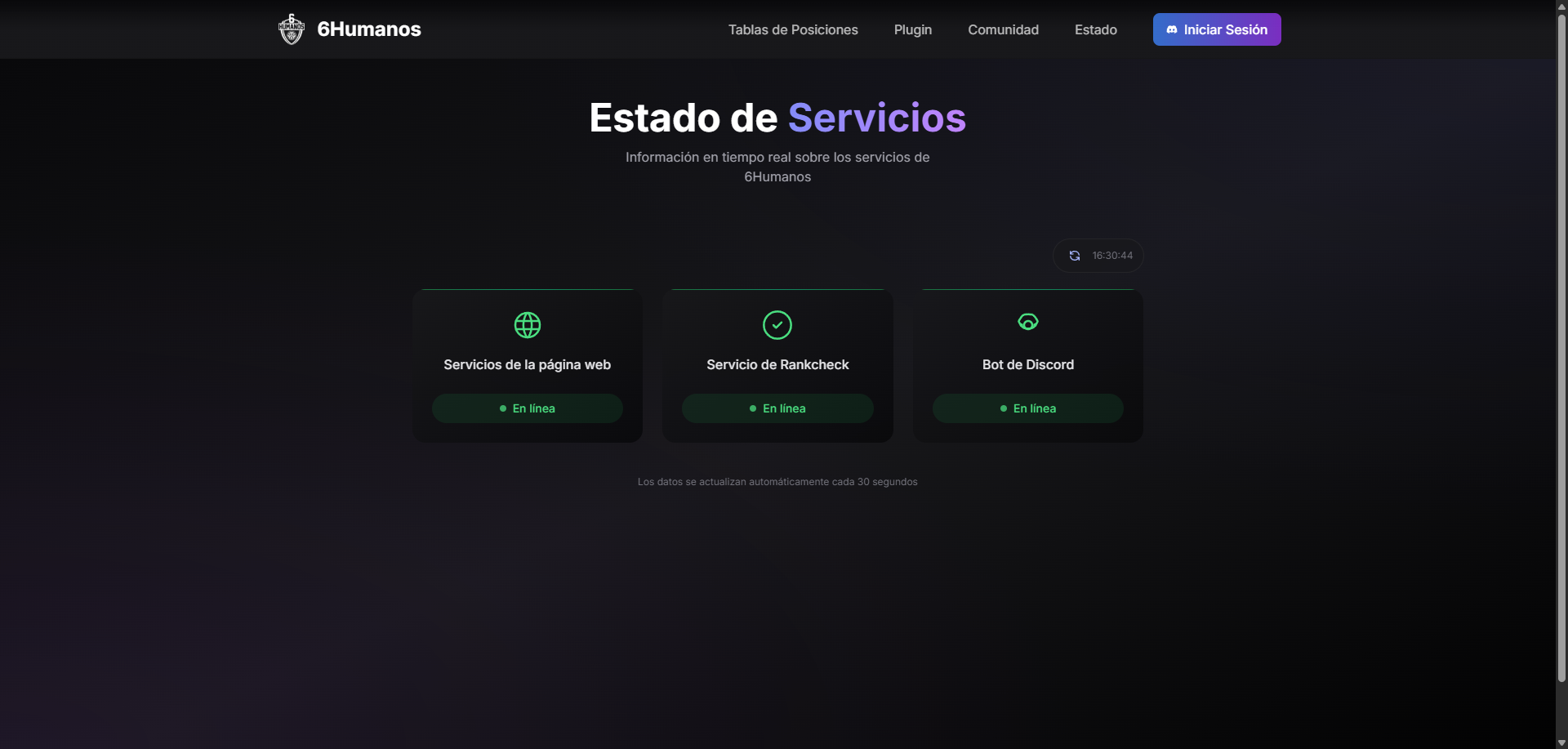 Real-time monitoring of all platform services and their current status
Features:
- Live status updates for all services
- Incident reporting
- Automatic status detection
- Public availability for transparency
🏆 Best Practices
- Error Handling
- Secure error messages
- Proper HTTP status codes
- Comprehensive logging
- Environment Management
- Secure variable storage
- Production vs development configurations
- Sensitive data protection
🎯 Conclusion
The infrastructure implements a comprehensive security strategy across all components:
- Strong authentication mechanisms
- Robust CSRF protection
- API security measures
- Secure headers
- Proper error handling
- Environment-aware configurations
- Advanced spam detection
- Multi-layered protection
This multi-faceted approach ensures protection against common vulnerabilities while maintaining optimal performance and user experience.
Key takeaways:
- Always implement defense in depth
- Regularly update and patch systems
- Monitor and log all activities
- Follow the principle of least privilege
- Use modern security tools and practices